UPDATED: Form Submission and Event Registration Summaries in Customer Insights - Journeys
Forms in Customer Insights Journeys have been evolving heavily over the last year with the introduction of custom fields and more detailed information on the submitted data means that my ‘Create Form Submission and Event Registration Summaries in Customer Insights - Journeys’ blog post needs a long overdue update!
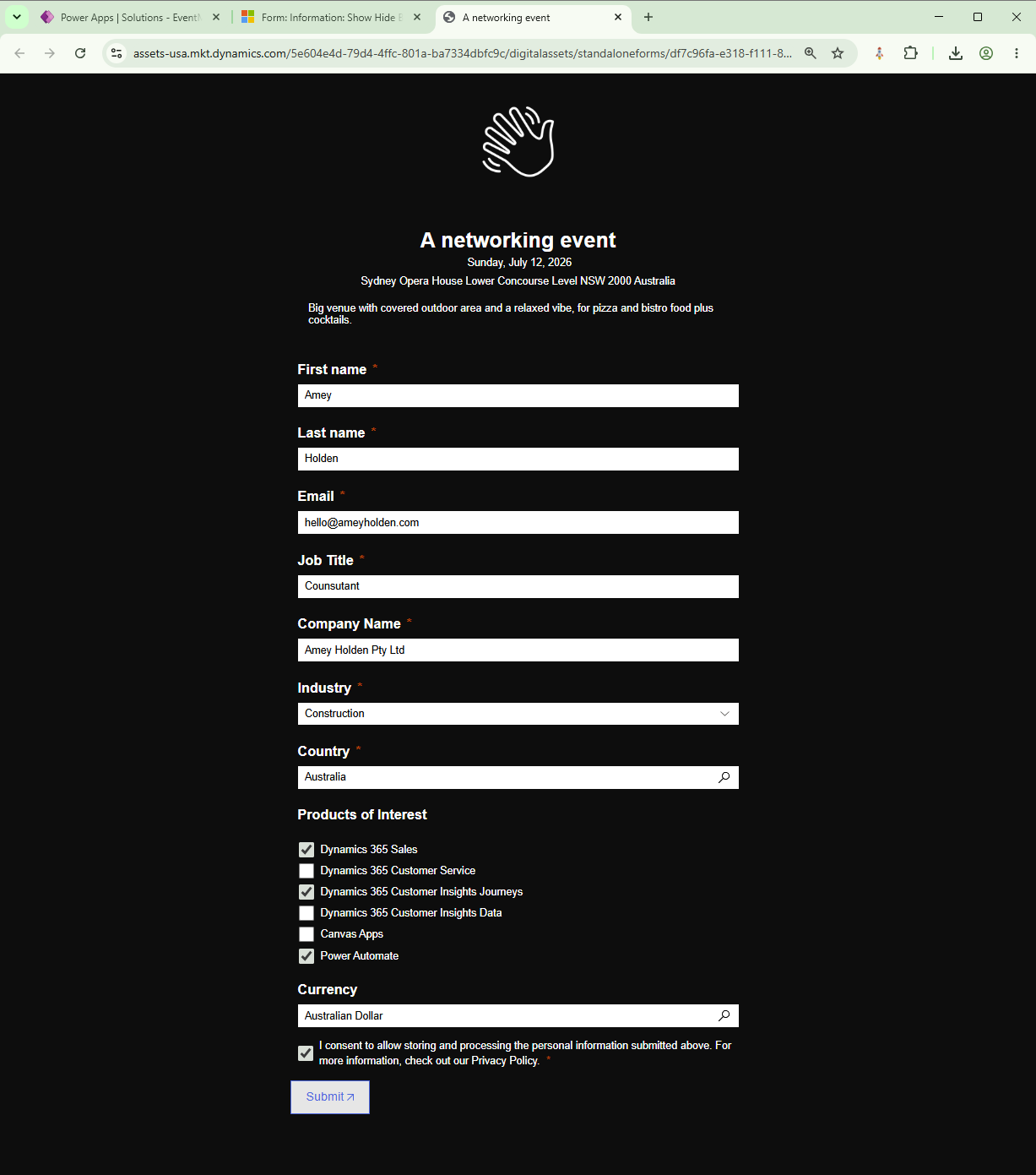
Form submissions from real-time marketing forms contain valuable data—but accessing and exporting that data can be frustrating and time-consuming. In this updated guide, you’ll learn how to automatically generate clean, readable summaries and structured JSON outputs using Power Automate, making your form and event data far easier to use across Dataverse and beyond.
Key Takeaways:
Automatically summarise form submissions into readable text
Generate JSON outputs for integrations and exports
Handle unmapped fields, consent, and lookups dynamically
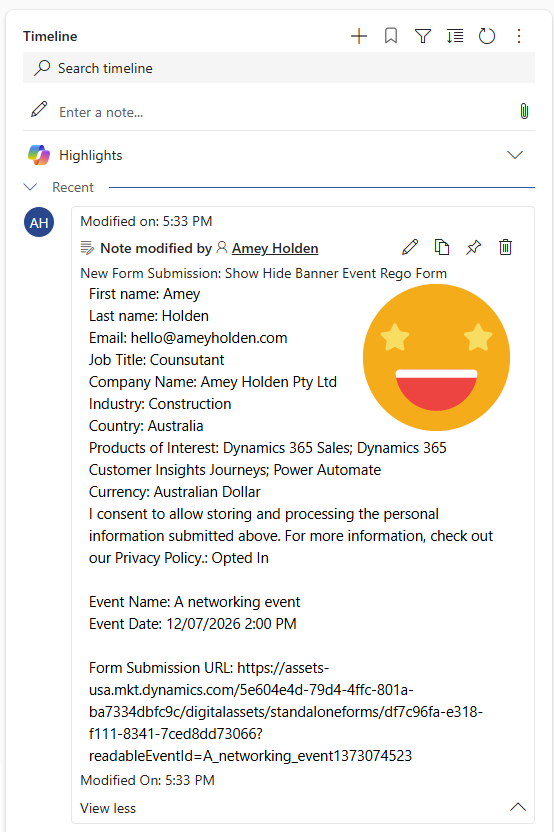
Enhance Dataverse with timeline notes for better visibility
Add a new ‘Field Type’ column
To help with our field submission related automations, we are going to add a PowerFX formula column that determines the field ‘type’ for each form submission so we can correctly process it.
NOTE: We cannot easily determine the column type for radio, checkbox, number or date fields yet, so there will be assumed as '‘Other’ which isn’t ideal especially for the dates but we can build with hopes for it to be possible later!
Add a Choice
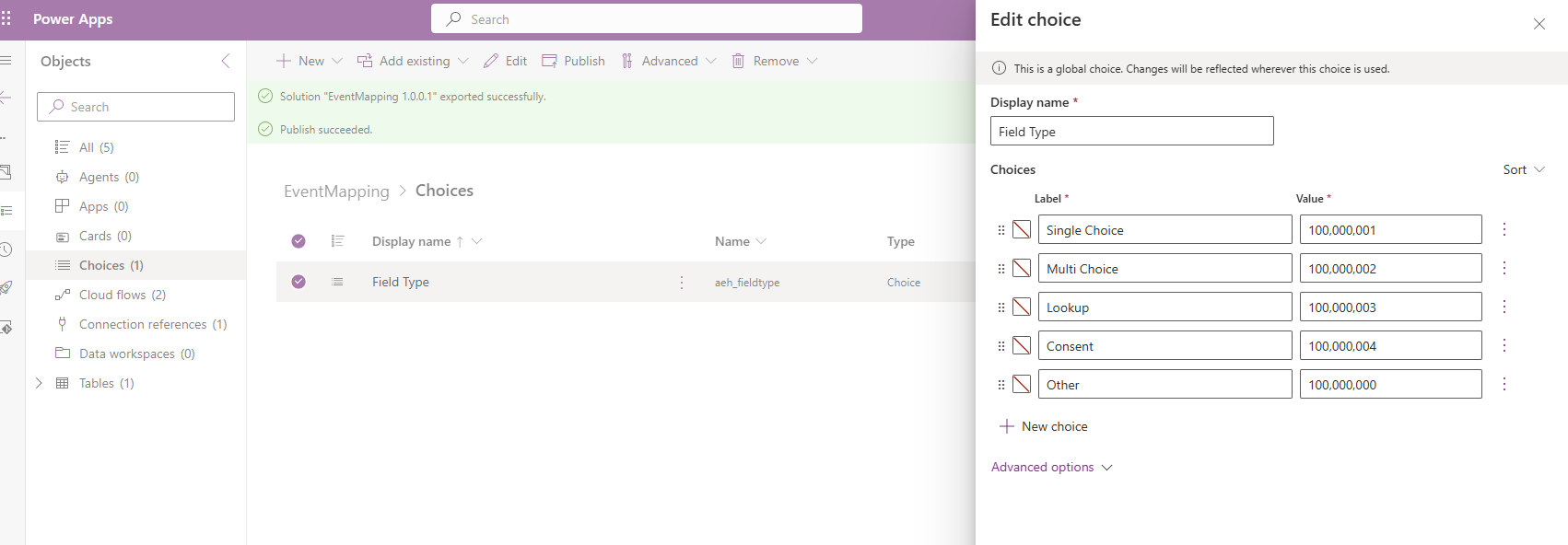
Create a global choice called ‘Field Type’ which the following options, publish it to use in the next step.
Single Choice
Multi Choice
Lookup
Consent
Other
Add a Column to the ‘Field Submission’ table
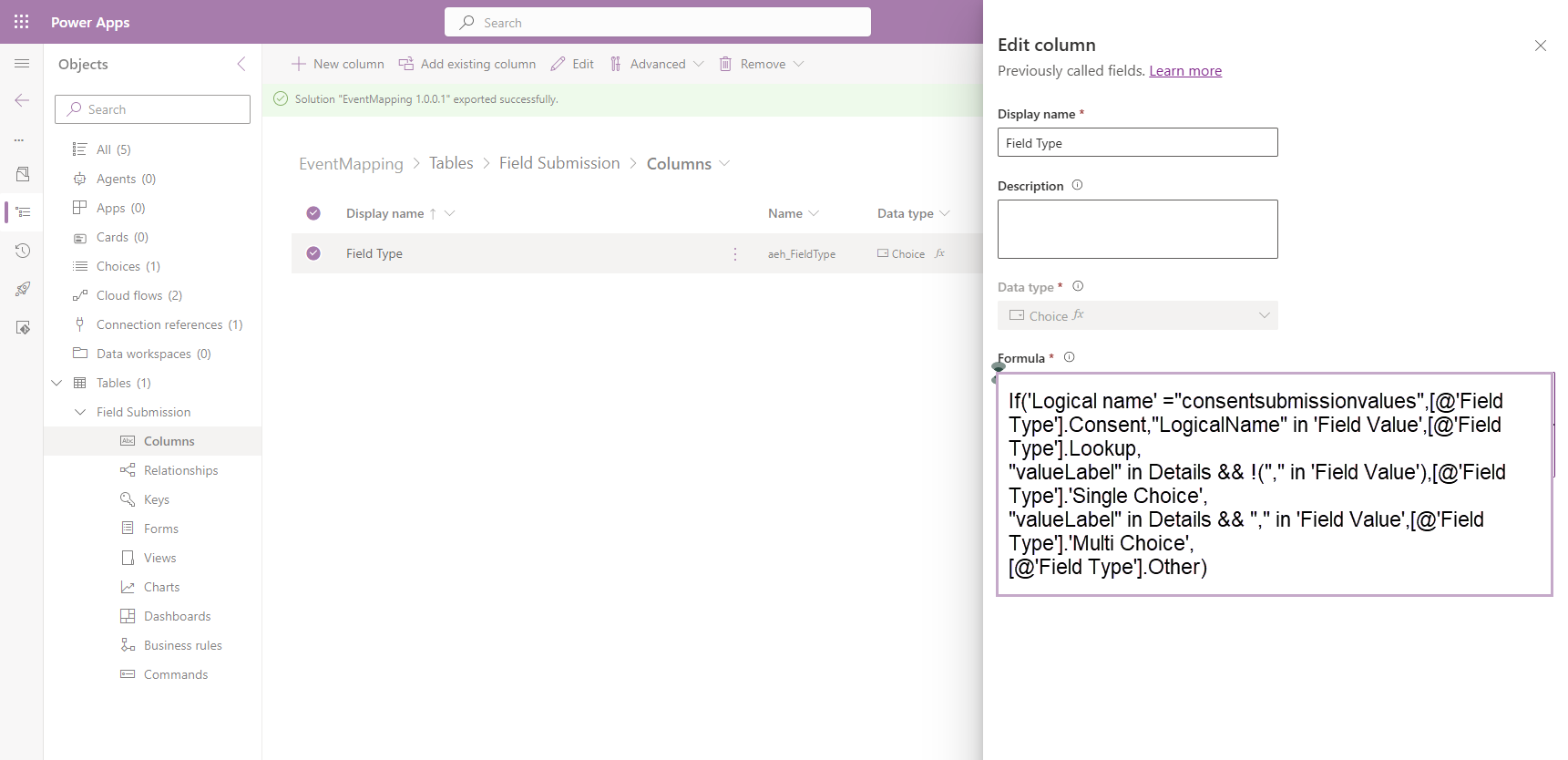
Add a new Power FX column ‘Field Type’ using the formula below.
If('Logical name' ="consentsubmissionvalues",[@'Field Type'].Consent,"LogicalName" in 'Field Value',[@'Field Type'].Lookup,
"valueLabel" in Details && !("," in 'Field Value'),[@'Field Type'].'Single Choice',
"valueLabel" in Details && "," in 'Field Value',[@'Field Type'].'Multi Choice',
[@'Field Type'].Other)
Add Columns to the ‘Field Submission’ form
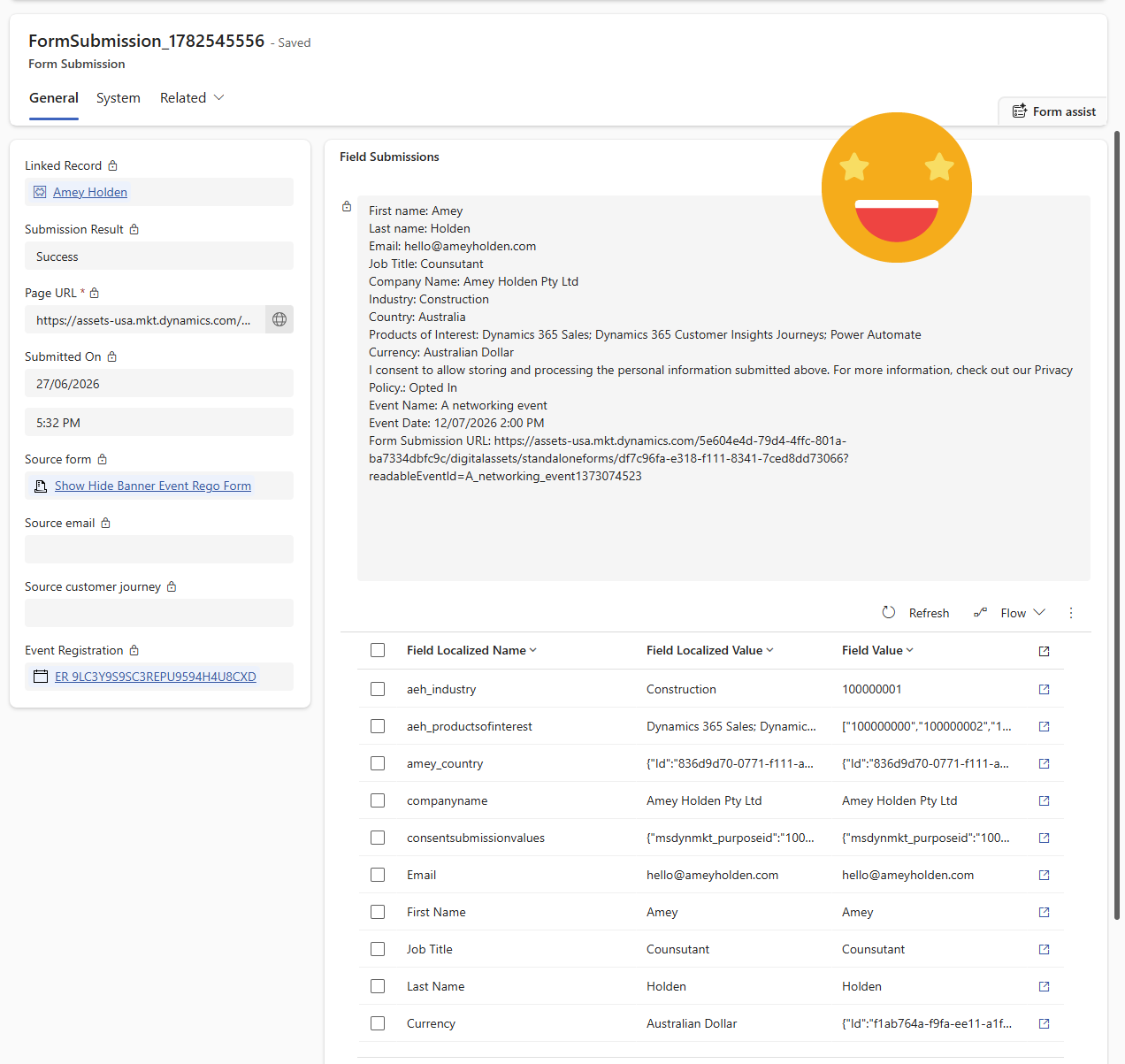
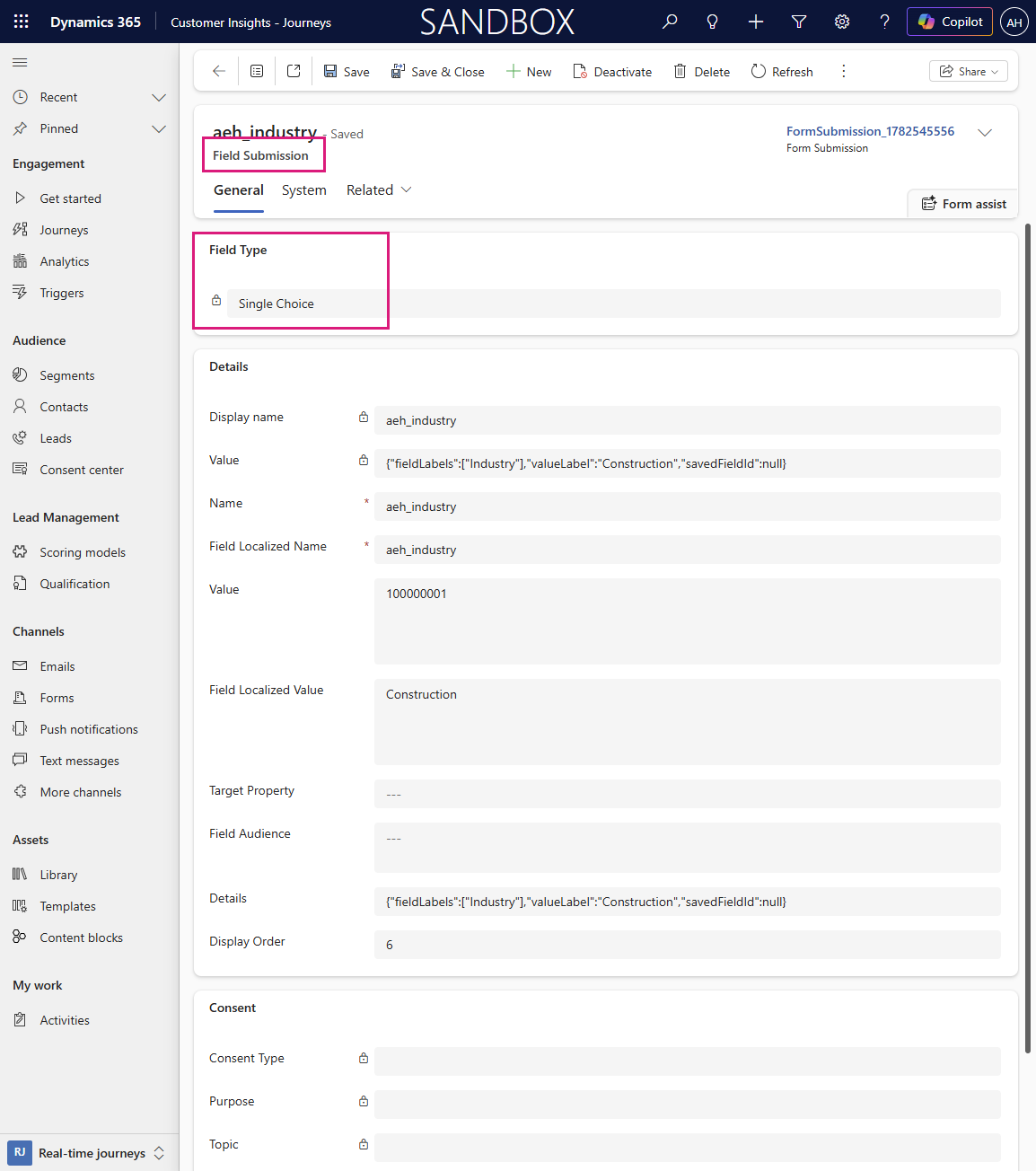
Update the ‘Field Submission’ form to show all the fields on the form so you can more easily view the data of the field submission and the plethora of random details it contains.
One mighty child flow
We will first create a child flow which creates the summary for a real-time marketing form submission which can be reused as part of any other form submission automations.

Manually trigger a flow
The good old ‘Flow button for mobile’ trigger strikes again. One text input to start with:
FormSubmissionGUID
Get the Field Submissions
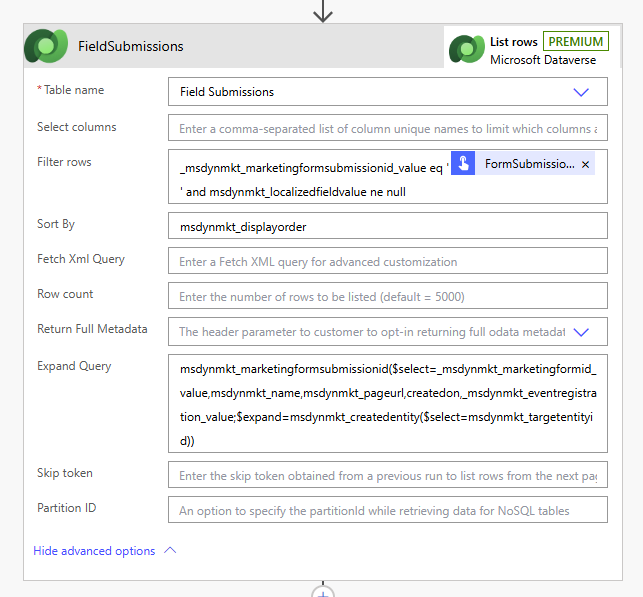
Each field on the marketing form creates a separate ‘field submission’, so we need to collect and process each of these one by one depending on the field type. And now we have the display order, we can sort the submission in order it was seen on the form too!
Dataverse: List rows - FieldSubmissions
Table Name: Field submissions
Filter rows: _msdynmkt_marketingformsubmissionid_value eq '@{triggerBody()['text']}' and msdynmkt_localizedfieldvalue ne null
Sort By: msdynmkt_displayorder
Expand Query: msdynmkt_marketingformsubmissionid($select=_msdynmkt_marketingformid_value,msdynmkt_name,msdynmkt_pageurl,createdon,_msdynmkt_eventregistration_value;$expand=msdynmkt_createdentity($select=msdynmkt_targetentityid))

Initialize Variables
Create the following variables
Type: Object - ‘SummaryJSON’
Type: String - ‘SummaryText’
Collect the field submission data
Now that the field submission data has better information for unmapped fields and consent, this needed an overhaul. For the JSON we use addProperty() to update the object, for the string we append the values.
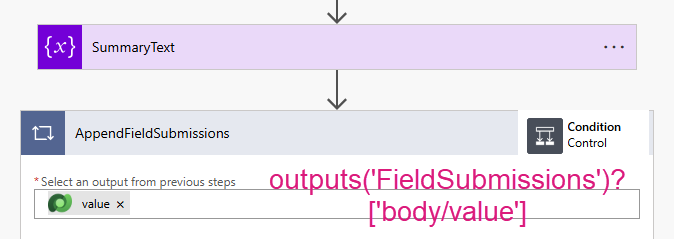
Control: Apply to Each - AppendFieldSubmissions
Select an output from previous steps: outputs('FieldSubmissions')?['body/value']
Consent Submissions
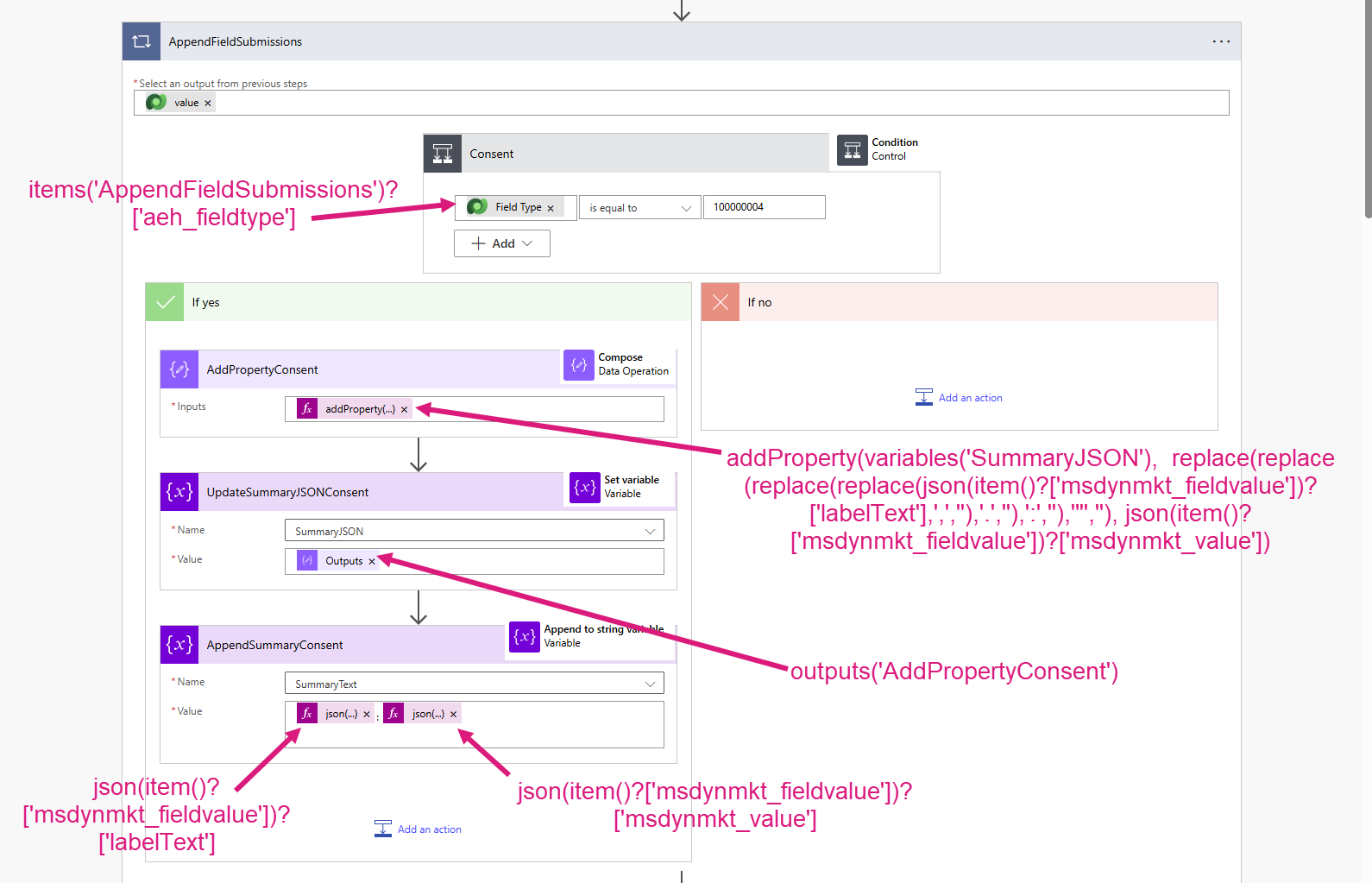
Data Operations: Condition - Consent
items('AppendFieldSubmissions')?['aeh_fieldtype']
is equal to
100000004 (Consent)
If Yes
Data Operations: Compose - AddPropertyConsent
Inputs: addProperty(variables('SummaryJSON'), replace(replace(replace(replace(json(item()?['msdynmkt_fieldvalue'])?['labelText'],',',''),'.',''),':',''),'"',''), json(item()?['msdynmkt_fieldvalue'])?['msdynmkt_value'])
Variables: Set variable - UpdateSummaryJSONConsent
Name: SummaryJSON
Value: outputs('AddPropertyConsent')
Variables: Append to string variable - AppendSummaryConsent
Name: SummaryText
Value: @{ json(item()?['msdynmkt_fieldvalue'])?['labelText']}: @{json(item()?['msdynmkt_fieldvalue'])?['msdynmkt_value']}
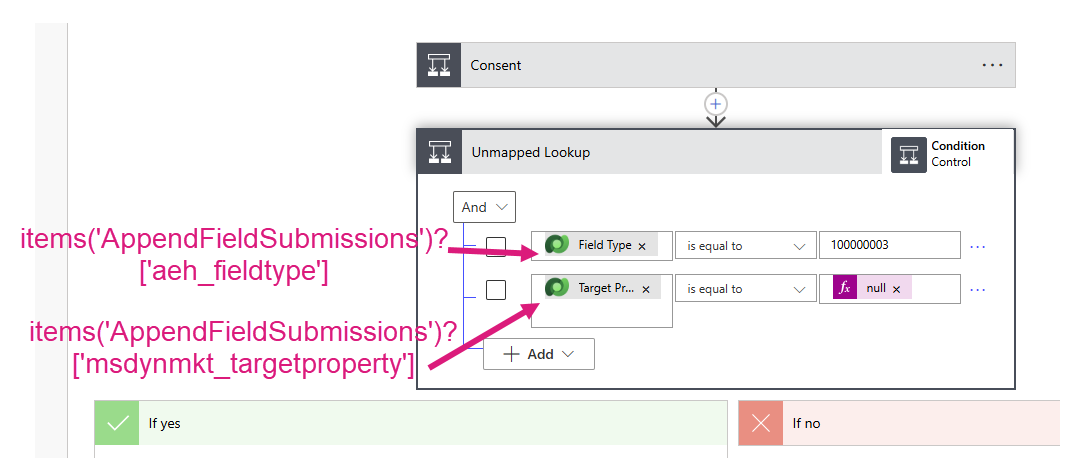
Data Operations: Condition - Unmapped Lookup
items('AppendFieldSubmissions')?['aeh_fieldtype']
is equal to
100000003 (Lookup)
AND
items('AppendFieldSubmissions')?['msdynmkt_targetproperty']
is equal to
null
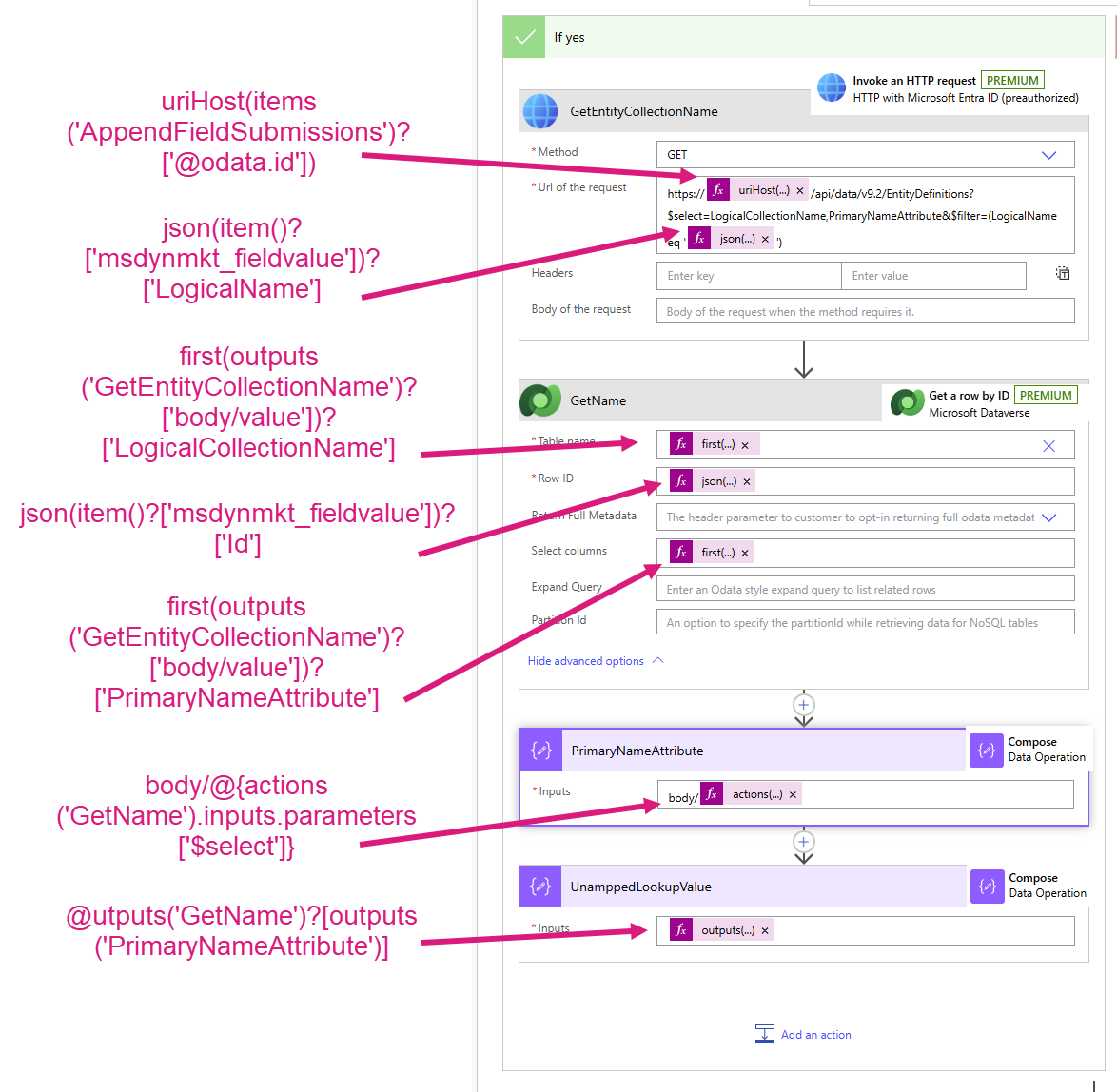
If Yes
HTTP with Entra ID (preauthorized): Invoke a HTTP Request - GetEntityCollectionName
Method: GET
Url of the request: https://@{uriHost(items('AppendFieldSubmissions')?['@odata.id'])}/api/data/v9.2/EntityDefinitions?$select=LogicalCollectionName,PrimaryNameAttribute&$filter=(LogicalName eq '@{json(item()?['msdynmkt_fieldvalue'])?['LogicalName']}')
Dataverse - Get a row: GetName
Table name: first(outputs('GetEntityCollectionName')?['body/value'])?['LogicalCollectionName']
Row ID: json(item()?['msdynmkt_fieldvalue'])?['Id']
Select columns: first(outputs('GetEntityCollectionName')?['body/value'])?['PrimaryNameAttribute']
Data Operations: Compose - PrimaryNameAttribute
Inputs: body/@{actions('GetName').inputs.parameters['$select']
Data Operations: Compose - UnamppedLookupValue
Inputs: outputs('GetName')?[outputs('PrimaryNameAttribute')]
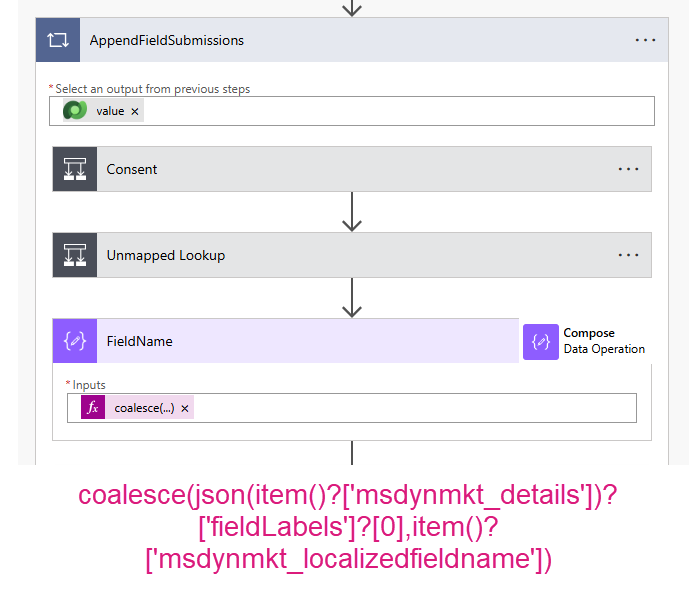
Data Operations: Compose - FieldName
Inputs: coalesce(json(item()?['msdynmkt_details'])?['fieldLabels']?[0],item()?['msdynmkt_localizedfieldname'])
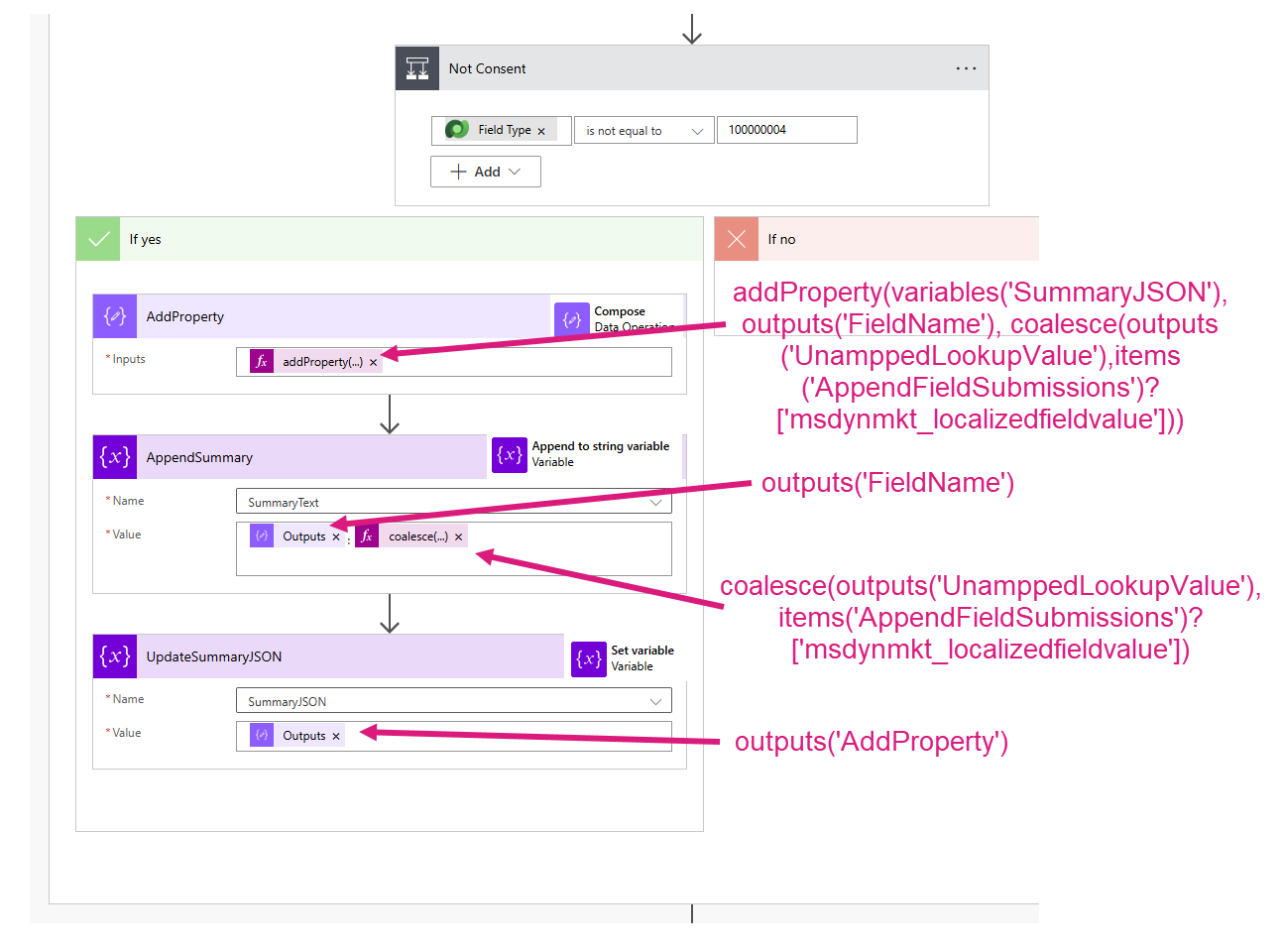
Data Operations: Condition - Not Consent
items('AppendFieldSubmissions')?['aeh_fieldtype']
is not equal to
100000004 (Consent)
If Yes
Data Operations: Compose - AddProperty
Inputs: addProperty(variables('SummaryJSON'), outputs('FieldName'), coalesce(outputs('UnamppedLookupValue'),items('AppendFieldSubmissions')?['msdynmkt_localizedfieldvalue']))
Variables: Append to string variable - AppendSummary
Name: SummaryText
Value: @{outputs('FieldName')}: @{coalesce(outputs('UnamppedLookupValue'), items('AppendFieldSubmissions')?['msdynmkt_localizedfieldvalue'])}
Variables: Set variable - UpdateSummaryJSON
Name: SummaryJSON
Value: outputs('AddProperty')
Include event details?
We need to include some event details in the summary for better context if the form submission was to register for an event
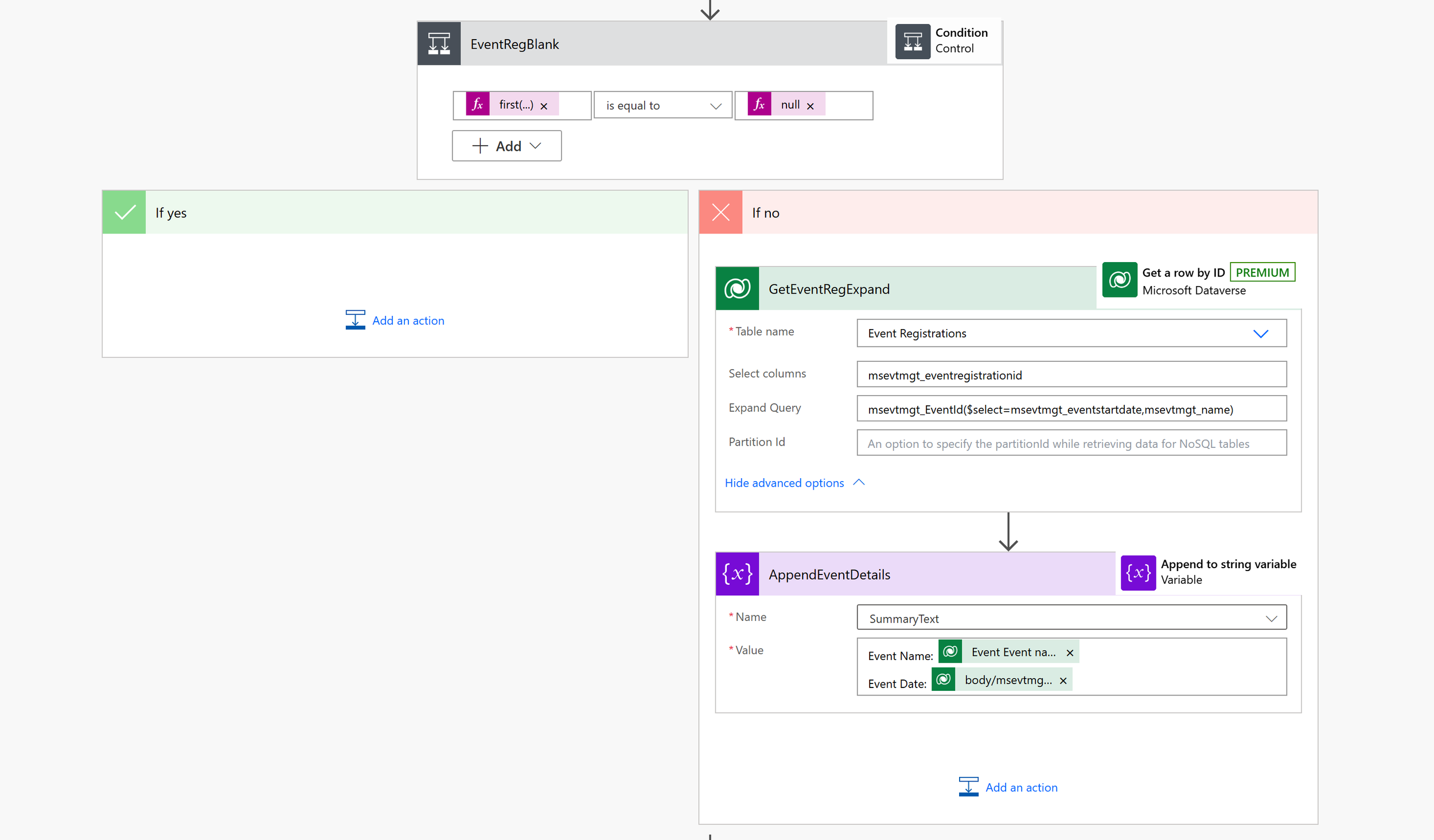
Control: Condition - EventRegBlank
first(outputs('FieldSubmissions')?['body/value'])?['msdynmkt_marketingformsubmissionid/_msdynmkt_eventregistration_value']
is not equal to
null
If No - Get the Event Registration Details
Dataverse: Get a row by ID - GetEventRegExpand
Table Name: Event Registrations
Row ID: first(outputs('FieldSubmissions')?['body/value'])?['msdynmkt_marketingformsubmissionid/_msdynmkt_eventregistration_value']
Select columns: msevtmgt_eventregistrationid
Expand Query: msevtmgt_EventId($select=msevtmgt_name,msevtmgt_eventstartdate)
Append Event Details
For the plain text summary, append the event name & start date, and any other event info you wish to add
Variables: Append to string variable - AppendEventDetails
Name: SummaryText
Value:
Event Name: @{outputs('GetEventRegExpand')?['body/msevtmgt_eventid/msevtmgt_name']}
Event Date: @{outputs('GetEventRegExpand')?['body/msevtmgt_eventid/msevtmgt_eventstartdate@OData.Community.Display.V1.FormattedValue']}
Add the Page URL
This gives better context on where the form was submitted from, especially if you have a form used in multiple places on a website. Parallel layout still optional, it’s just how my brain works best.

Variables: Append to string variable - AppendPageURL
Name: SummaryText
Value: Form Submission URL: @{first(outputs('FieldSubmissions')?['body/value'])?['msdynmkt_marketingformsubmissionid/msdynmkt_pageurl']}
Data Operations: Compose - AddPropertyPageURL
Inputs: addProperty(variables('SummaryJSON'), 'Form Submission URL', first(outputs('FieldSubmissions')?['body/value'])?['msdynmkt_marketingformsubmissionid/msdynmkt_pageurl'])

Add the summary to the form submission
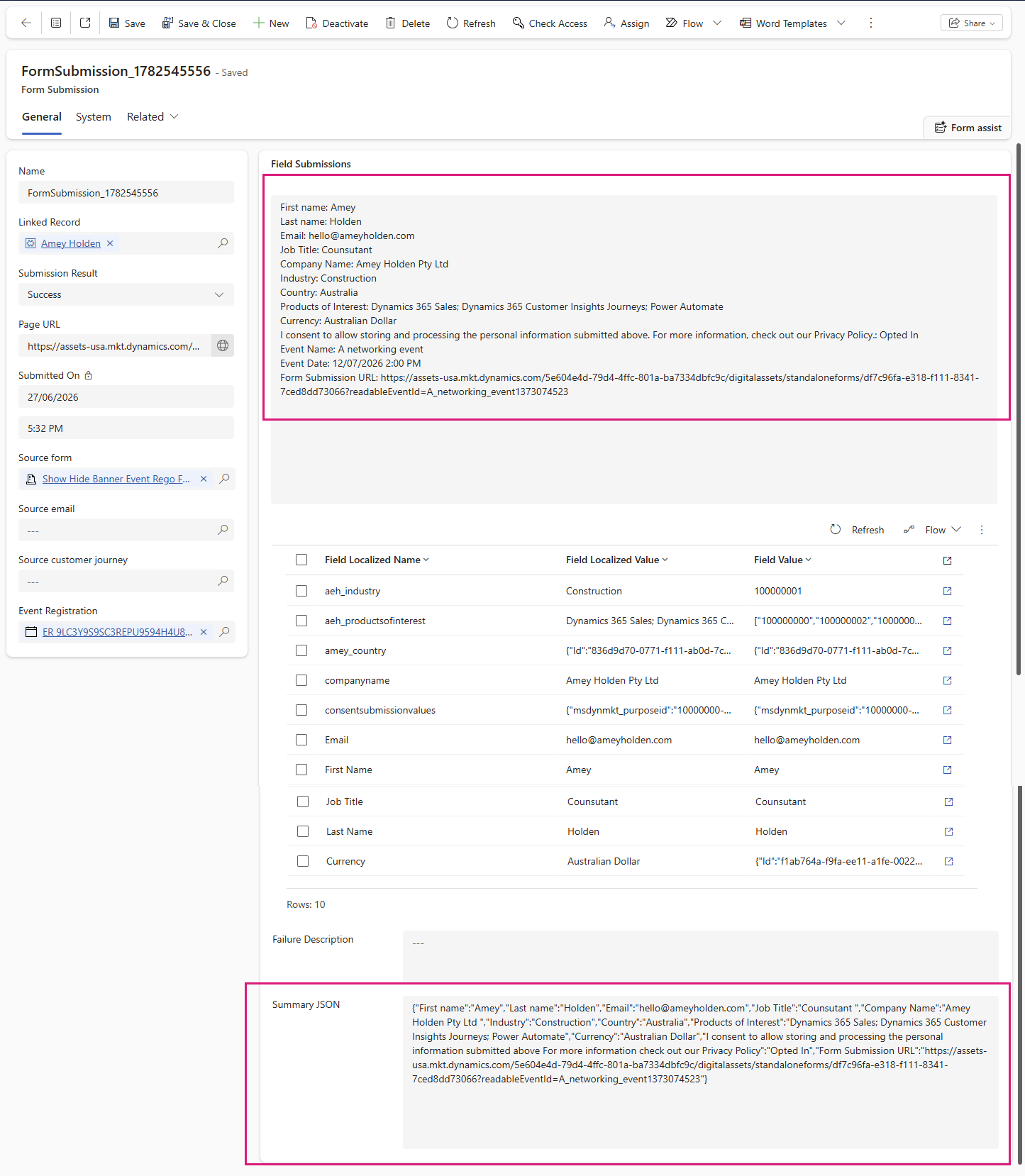
You will need to create two custom columns on the form submission table to capture the summary & JSON summary text which will allow us to use this data in any future automations.
Dataverse: Update a row - UpdateFormSubmission
Table name: Form Submissions
Row ID: triggerBody()['text']
Summary: variables('SummaryText')
Summary JSON: outputs('AddPropertyPageURL')
Add a note or activity to the timeline (optional)
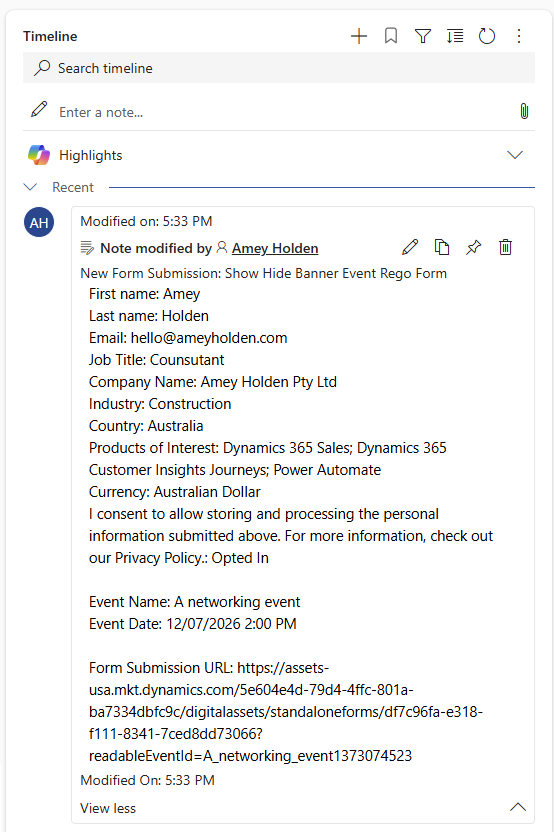
This step is optional, but very useful to give a quick at a glance summary of the form submission details on the timeline of the relevant Lead or Contact. I prefer to use a custom activity where possible as you can mark the activity as ‘Complete’ so it is locked down read only, but Notes is easy because it’s already there ready to use. You can just pick the summary from the form submission field you just populated to add your activity of choice.
Get Form Submission Details
Dataverse: Get a row - GetFormSubmissionExpand
Table name: Form Submissions
Row ID: triggerBody()['text']
Select columns: msdynmkt_marketingformsubmissionid,_owningbusinessunit_value,amey_summary,amey_summaryjson
Expand Query: msdynmkt_createdentity($select=_msdynmkt_targetcontact_value,_msdynmkt_targetlead_value),msdynmkt_marketingformid($select=msdynmkt_name)
Check for Linked Contact or Lead
Data Operations: Condition - Has Linked Record
outputs('GetFormSubmissionExpand')?['body/msdynmkt_createdentity/_msdynmkt_targetcontact_value']
is not equal to
null
OR
outputs('GetFormSubmissionExpand')?['body/msdynmkt_createdentity/_msdynmkt_targetlead_value']
is not equal to
null
If Yes
Create a Note Linked to the Related Contact or Lead
Dataverse: Add a row - AddNote
Table Name: Notes
Title: New Form Submission: @{outputs('GetFormSubmissionExpand')?['body/msdynmkt_marketingformid/msdynmkt_name']}
Description: outputs('GetFormSubmissionExpand')?['body/amey_summary']
Record Created On: outputs('UpdateFormSubmission')?['body/createdon']
Dataverse: Update a row - SetRegardingNote
Table Name: string('annotations')
Row Id: outputs('AddNote')?['body/annotationid']
Row Item:
{
  "objectid_@{if(equals(outputs('GetFormSubmissionExpand')?['body/msdynmkt_createdentity/_msdynmkt_targetlead_value'],null),'contact','lead')}@odata.bind": "/@{if(equals(outputs('GetFormSubmissionExpand')?['body/msdynmkt_createdentity/_msdynmkt_targetlead_value'],null),'contacts','leads')}(@{coalesce(outputs('GetFormSubmissionExpand')?['body/msdynmkt_createdentity/_msdynmkt_targetlead_value'],outputs('GetFormSubmissionExpand')?['body/msdynmkt_createdentity/_msdynmkt_targetcontact_value'])})"
}

Respond to the parent flow
Tell the parent flow you are done, so the rest of the form submission magic can continue (and use the summary if needed).
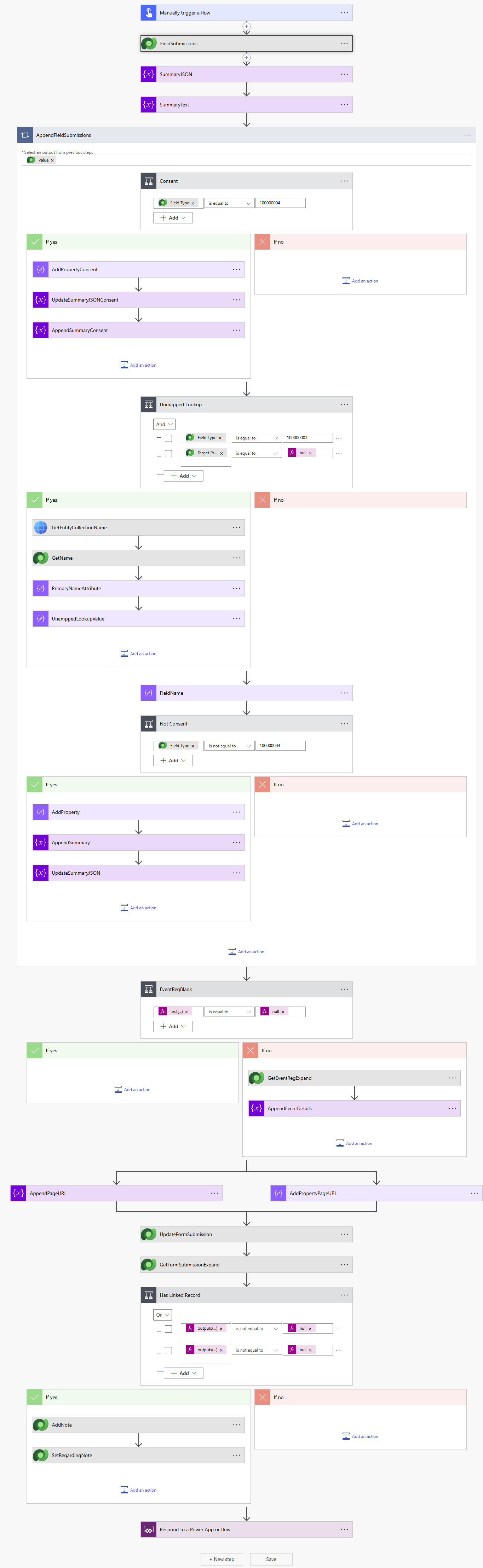
End to end flow
In case you got a little lost, this is the flow from start to finish.